Swap the product in a video you already shot
AI product video generator
Upload a short clip you already have, add one to three images of your product and say what to replace. A video-editing model is asked to swap that object for your product. How well it does depends on your footage and images, and results vary; a failed generation is refunded. You pay per second of your clip, and the price is shown before you generate.
- 3 to 15 s clips
- 1 to 3 product images
- From 126 credits
- Not for real people
MP4 or MOV, 3 to 15 seconds, up to 100 MB, shorter side at least 320 px, longer side at most 2160 px.
You confirm this before every generation. The site does not scan the video, so what you upload is your responsibility.
Checking that generation is available.
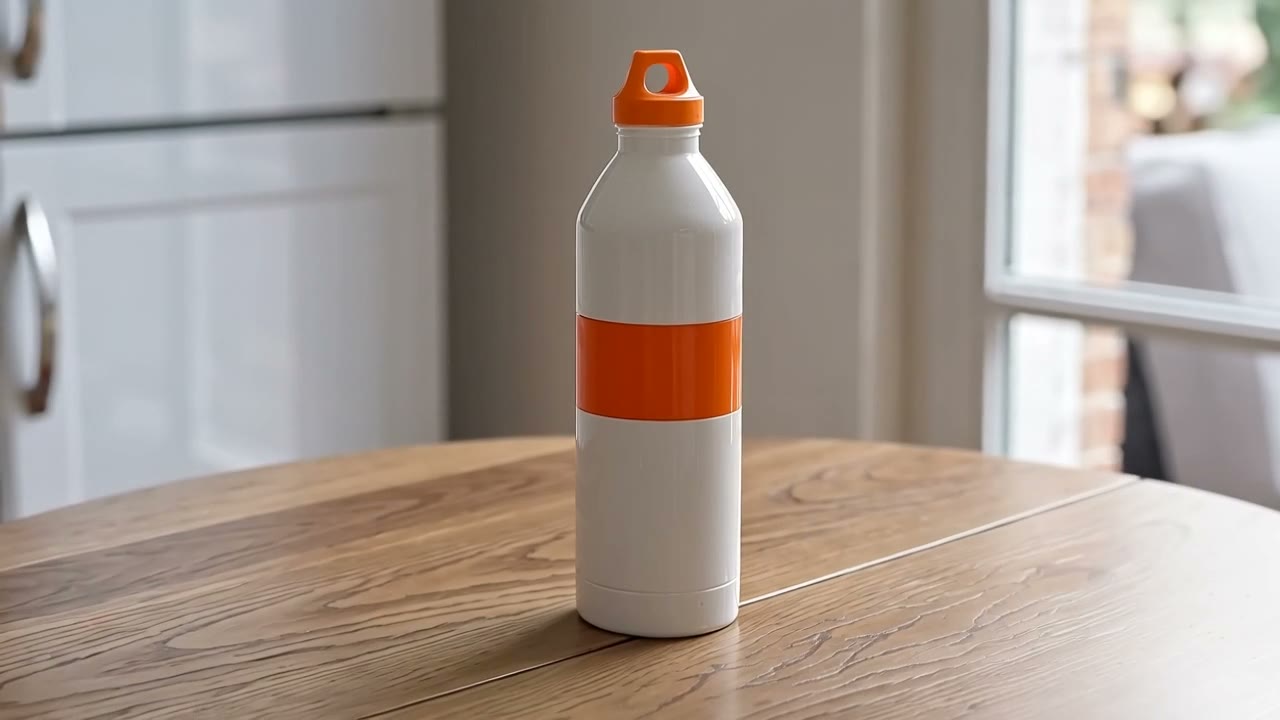
Green bottle swapped for a white one: Happy Horse Video Edit5s · 16:9 · 720p2026-10-11
01
What is an AI product video generator?
An AI product video generator makes product video with the help of a model. This one works on footage you already have: you upload a short clip, add one to three images of your product and write what to replace, and a video-editing model is asked to swap that object for your product. It works on your video instead of starting from a blank prompt. Results vary, and a generation that fails is refunded. You are charged per second of your clip.
- You give
- A clip, product images, one instruction
- Clip
- MP4 or MOV, 3 to 15 seconds
- Product images
- One to three
- Price
- 70 credits per second at 720p
02
Two real edits of one clip
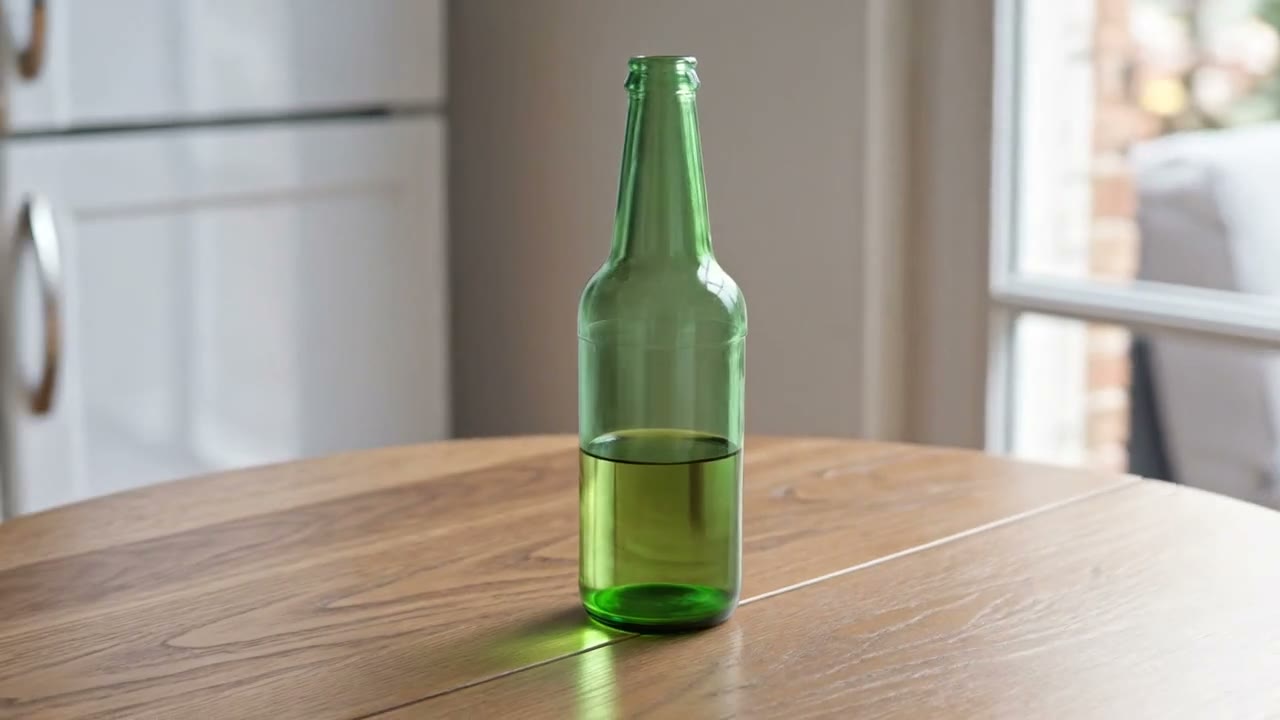
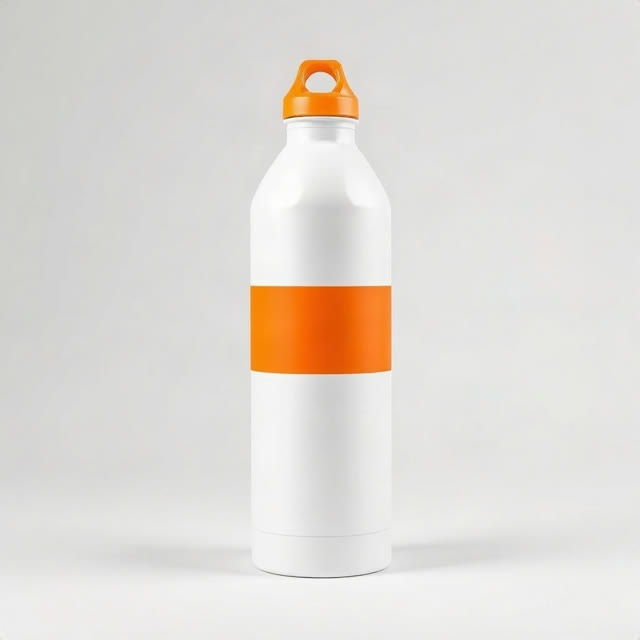
These are real outputs, made through fal.ai on October 11, 2026 (UTC) from one AI-generated 5-second clip of a green glass bottle on a wooden table (the camera moves slowly around it) and one AI-generated product image of a white bottle with an orange cap and stripe. Both used the same instruction. One edit is Happy Horse Video Edit at 720p, the other Kling O1 Video Edit. Each is shown against the original with its receipt; “Use this instruction” fills the generator’s instruction box, and you upload your own clip and images. At the current site rates, a 5.04 s clip is charged as 6 s: 420 credits with Happy Horse at 720p and 252 with Kling O1. It is one clip and one product, so the notes do not predict your result.
Scene 01
Green bottle swapped for a white one: Happy Horse Video Edit
The green glass bottle is replaced by the product, and the slow camera orbit of the original is kept. We did not see a trace of the original bottle on the table. The clip runs 5.04 s at 1280×720 and has no audio track (the original had none either). It is charged as 6 s, because the length is rounded up.
Product image
Instruction
Replace the green glass bottle on the table with the product in the image. Keep everything else the same.
Receipt
- Model
- Happy Horse Video Edit
- Length
- 5.04 s, charged as 6 s
- Output
- 1280×720 · 720p · Sound Off
- Generated
- 2026-10-11
- Took
- 213 s
- Provider cost
- $0.84
- Here
- 420 credits
- Request
- 01a12879-33bf-7c90-9d77-a3cba2974d35
Scene 02
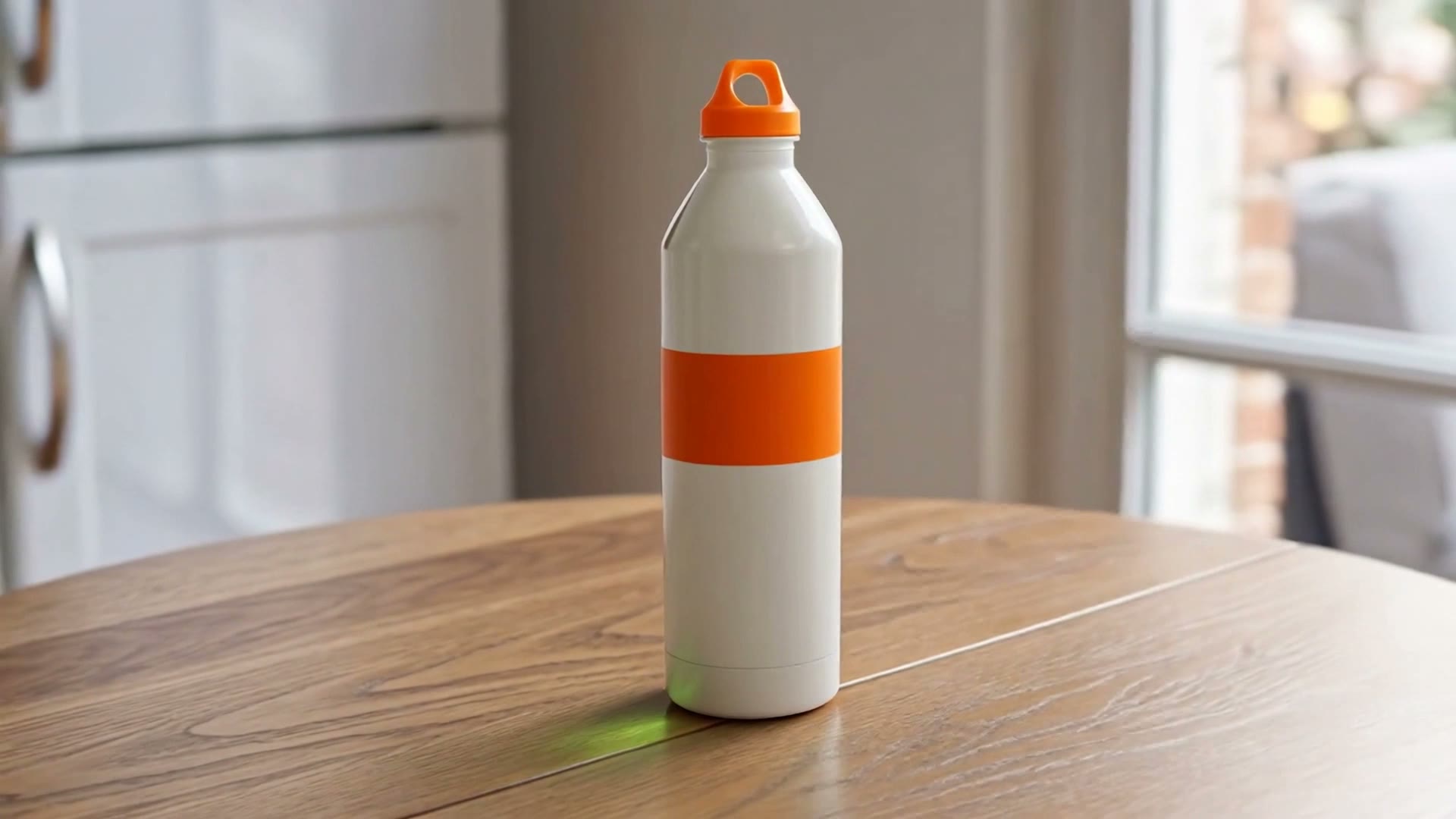
Green bottle swapped for a white one: Kling O1 Video Edit
The bottle is replaced and the camera orbit is kept. A faint green reflection of the original bottle remains on the table beside the new one. The clip runs 5.04 s and came back at 1920×1080 from a 1280×720 original, with no audio track. It is charged as 6 s, because the length is rounded up.
Product image
Instruction
Replace the green glass bottle on the table with the product in the image. Keep everything else the same.
Receipt
- Model
- Kling O1 Video Edit
- Length
- 5.04 s, charged as 6 s
- Output
- 1920×1080 · Sound Off
- Generated
- 2026-10-11
- Took
- 149 s
- Provider cost
- $1.01
- Here
- 252 credits
- Request
- 01a1287b-db27-7ac3-b328-ce8c8e072f50
03
Specs of the two editing models offered
What each model takes at the API, and what this site offers. Specifications and public prices were re-read on October 12, 2026. Published prices are cost estimates, not confirmed invoices.
- Happy Horse Video Edit: inputs
- A video, up to five reference images, a prompt, resolution and a sound settingSource: fal.ai Happy Horse video edit page
- Happy Horse Video Edit: input video
- 3 to 60 seconds, MP4 or MOV, up to 100 MB, more than 8 FPSSource: fal.ai Happy Horse video edit page
- Happy Horse Video Edit: output
- As long as the input, up to 15 seconds; 720p or 1080pSource: fal.ai Happy Horse video edit page
- Happy Horse Video Edit: API price
- Published input + output total: $0.28 per second at 720p, $0.56 at 1080pThe same page also lists lower output-only prices of $0.14/$0.28. Site quotes use the higher published total; actual provider settlement has not been confirmed.Source: fal.ai Happy Horse video edit page
- Kling O1 Video Edit: inputs
- A video, reference images (at most four in total), a prompt and a keep-sound switchSource: fal.ai Kling O1 video edit page
- Kling O1 Video Edit: input video
- 3 to 10.05 seconds, 720 to 2160 px, up to 200 MB, 24 to 60 FPSSource: fal.ai Kling O1 video edit page
- Kling O1 Video Edit: API price
- $0.168 per input secondSource: fal.ai Kling O1 video edit page
- On this site
- Clips of 3 to 15 seconds (10 with Kling O1), up to 100 MB, one to three product imagesNot offered here: longer clips, trimming a clip for you, videos that show identifiable real people.
- Price on this site
- 70 credits per second at 720p and 140 at 1080p (Happy Horse); 42 credits per second (Kling O1)
Last checked 2026-10-12
04
How to swap a product in a video here
Upload your clip
An MP4 or MOV, 3 to 15 seconds and up to 100 MB. The site reads the length from the file itself, so it is the figure you are charged for. A clip up to 0.5 s over 15 (phones often write 15.02) is taken and charged as 15; anything longer is refused, not trimmed. Kling O1 has no such allowance.
Add product images
One to three images of the product that should appear in the video. You do not need any special syntax: you refer to them as "the product in the images", and the site tells the model which image is which.
Say what to replace
Write one instruction in plain words, such as "replace the bottle on the table with the product in the images". Pick 720p or 1080p where the model has the choice, and whether to keep the clip’s original sound.
Check the price, confirm, generate
The credit cost is shown before you generate: your clip’s length rounded up to a whole second, times the model’s rate. Tick the box that says you may edit the video, then generate. If a generation fails the credits come back automatically.
05
How this site works
What you can count on here, and what you should not expect.
The price before you pay it
The site measures your clip from the uploaded file, rounds the length up to a whole second and multiplies by the model’s rate. That is the figure on screen, and it is the figure charged. A length typed into a form is never used.
Failed jobs are refunded automatically
If a generation fails, the credits come back on their own. A finished clip that plays but that you do not like is still charged.
A rule about your video, not a detector
You confirm before every generation that you own the video or have the right to edit it, and that it does not show identifiable real people. This is a rule you agree to; the site does not look at your video to check it, so what you upload is your responsibility.
What is not offered here
Clips longer than 15 seconds (10 with Kling O1) or shorter than 3, trimming or splitting a clip for you, and videos that show identifiable real people.
Compare with your original
When a result arrives you can play it next to your original in the same page. The comparison uses the file in your browser tab, so it is there only until you reload or close the page. A reload keeps the clip selected for generating, but not the file used for the comparison.
No results promised
The two edits on the home page come from one clip and one product image. Other footage can come out differently, and nothing here promises how an edit will look or how well the rest of the scene is kept.
06
What an edit costs here
You are charged per second of your clip, rounded up to a whole second: 70 credits per second at 720p and 140 at 1080p with Happy Horse Video Edit, 42 with Kling O1 Video Edit. The shortest clip is 3 seconds, so the smallest edit costs 126 credits. Packs and plans are on the pricing page.
| Model | Length | Resolution | Credits | With the smallest pack |
|---|---|---|---|---|
| Happy Horse Video Edit | per second | 720p | 70 | $0.70 |
| Happy Horse Video Edit | per second | 1080p | 140 | $1.40 |
| Kling O1 Video Edit | per second | — | 42 | $0.42 |
07
Common questions
Can I use a video that shows people?
No. You confirm before each generation that the video does not show identifiable real people and that you may edit it. It is a rule, not a detector: the site does not look at your video.
How long can my clip be?
Between 3 and 15 seconds, and up to 100 MB. Kling O1 Video Edit takes clips up to 10 seconds. A longer clip is refused rather than trimmed, and nothing is charged.
How is the price worked out?
The site reads your clip’s length from the file, rounds it up to a whole second and multiplies by the model’s rate. A clip of 8.2 seconds is charged as 9 seconds: 630 credits at 720p with Happy Horse. The figure is shown before you generate.
Do I write special tags for the product images?
No. Write plain words such as "the product in the images". The site adds the references the model needs.
Is it free?
There is no free allowance: every clip is paid for with credits. The smallest edit costs 126 credits, and the exact cost of yours is shown before you generate.
What happens when a generation fails?
The credits come back to your balance automatically. A finished clip that plays but that you do not like is still charged.
Will the rest of my scene stay the same?
In the two edits recorded here (see the home page), the bottle was replaced and the camera orbit of the original was kept. With Kling O1 Video Edit a faint green reflection of the original bottle remained on the table; with Happy Horse Video Edit we did not see it. That is one clip with one product image, so it says nothing certain about your footage.
Swap the product in your video
Upload a clip, add your product images, say what to replace and check the credit cost. A failed generation is refunded.
08
Other video models are on Cicadas
AI Product Video does one thing: it edits a clip you upload. The team behind it also operates Cicadas, a separate site with other video models. Accounts and credits are not shared between the two sites.
Visit Cicadas